
Have you ever wondered how your phone recognizes your face, how YouTube recommends videos, or how a navigation app suggests a faster route? Artificial intelligence, commonly known as AI, helps make many of these features possible.
Artificial Intelligence is a branch of computer science focused on building systems that can perform tasks such as understanding language, recognizing patterns, solving problems, and making predictions.
You don’t need to be a programmer to use AI. Many tools are designed for everyday users. You can ask an AI assistant to explain a difficult topic, summarize a long document, help you plan a trip, or suggest ideas for a project.
However, AI is not a magic tool that always knows the right answer. It can misunderstand a question, miss important details, or provide incorrect information. Understanding both its uses and limitations will help you get better results.
How Does Artificial Intelligence Work?
The way AI works depends on the type of system being used. Many modern AI applications learn patterns from data and use those patterns to produce an output.
Let’s look at a simple example.
Imagine you want an email application to identify spam messages. A machine learning system can be trained using examples of spam and legitimate emails. During training, it learns patterns that help distinguish between the two. When a new email arrives, the system estimates whether it is likely to be spam.
Many AI systems follow a process like this:
1. Collecting Data
AI systems use information such as text, images, audio, or numerical records. The type of data depends on the task.
For example, a voice recognition system processes audio, while an image recognition system works with pictures.
2. Training the Model
In machine learning, a model learns patterns from training data. Developers evaluate its performance and adjust the training process to improve results.
The quality of the data matters. Incomplete, outdated, or biased data can lead to unreliable outcomes.
3. Processing New Information
After training, the model can process new inputs. It may classify an image, predict a result, recognize spoken words, or generate a response.
4. Producing an Output
The system provides a result based on its design. That result might be a recommendation, a prediction, a summary, or newly generated content.
Not every AI system learns continuously from its users. Some models remain unchanged after deployment, while others can be updated through a separate training or improvement process.
What Are the Main Types of Artificial Intelligence?
AI can be grouped in different ways. The following categories explain some of the most common approaches and concepts.
Narrow AI
Narrow AI is designed for a specific task or a limited set of tasks. Examples include spam filters, recommendation systems, voice recognition, and many customer-service chatbots.
Most AI applications available today fall into this category.
Artificial General Intelligence (AGI)
Artificial General Intelligence refers to a hypothetical AI system that could perform a broad range of intellectual tasks at a level comparable to humans.
AGI remains an unsolved research goal. Today’s AI assistants should not be assumed to have general human-like intelligence.
Machine Learning
Machine learning is a branch of AI that enables systems to learn patterns from data instead of relying entirely on manually written rules.
It is used in fraud detection, recommendations, forecasting, and many other applications.
Deep Learning
Deep learning uses neural networks with multiple layers to learn complex patterns. It has helped advance image recognition, speech processing, and language technology.
Generative AI
Generative AI creates new content, including text, images, audio, video, and computer code.
For example, a generative AI assistant can help draft an email, explain a programming error, or suggest ideas for a presentation. Its output still needs checking, particularly when accuracy matters.
How Is AI Used in Everyday Life?
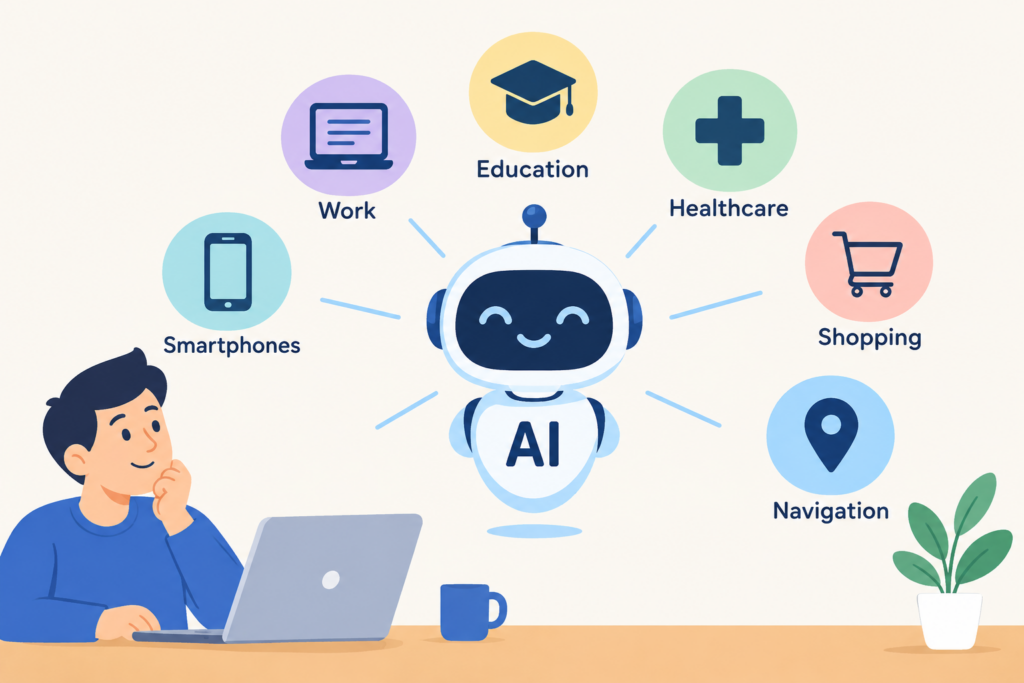
You may already interact with AI several times a day without thinking about it. Here are some practical examples.
AI in Smartphones
Face recognition, voice assistants, photo enhancement, and predictive text are examples of features that may use AI techniques.
These features can make everyday tasks easier, although their capabilities vary between devices and applications.
AI in Online Shopping
Shopping platforms may recommend products based on browsing activity, previous purchases, and other signals.
Recommendations can help customers discover relevant products, but they may also reflect commercial priorities or incomplete assumptions about a user’s preferences.
AI in Navigation
Navigation applications use traffic information, location data, and prediction methods to estimate travel times and suggest routes.
These estimates can change when road conditions, traffic, or other circumstances change.
AI in Education
Students can use AI tools to understand difficult concepts, generate practice questions, summarize notes, and explore alternative explanations.
For example, instead of asking an AI tool to complete an entire assignment, a student could ask it to explain a confusing topic and then solve practice questions independently.
AI in Software Development
Developers use AI coding assistants to explain unfamiliar code, suggest possible solutions, generate test cases, and help find bugs.
AI-generated code is not always correct or secure. Developers should review, test, and understand the code before using it in a real application.
AI in Healthcare
AI-assisted systems can help qualified professionals analyze medical images, organize information, and identify patterns in research data.
These tools can support healthcare work, but their results need appropriate clinical evaluation. An AI-generated answer should not replace professional medical advice.
What Are the Benefits of Artificial Intelligence?
AI can be useful when it is applied to the right problem and its results are checked appropriately.
1. Saves time: AI can help with repetitive tasks, such as summarizing documents, sorting information, and preparing initial drafts.
2. Processes large amounts of data: AI systems can analyze datasets and identify patterns that may be difficult to find manually.
3. Supports learning: AI assistants can explain concepts in different ways and provide additional practice examples.
4. Helps with accessibility: Speech recognition, text-to-speech, translation, and image description tools can make information easier to access.
5. Supports decision-making: AI can provide predictions, summaries, and recommendations that people can consider alongside other evidence.
6. Helps generate ideas: Writers, designers, developers, and business owners can use generative AI to explore ideas and create initial drafts.
These benefits are not automatic. Results depend on the tool, the quality of the information provided, and how carefully the output is reviewed.
What Are the Risks and Limitations of AI?
Although AI can be helpful, it also has weaknesses that users should understand.
AI Can Give Wrong Answers
Some AI tools produce convincing responses even when the information is incorrect. This is especially important when researching medical, financial, legal, or other high-stakes topics.
Check important claims against reliable sources rather than relying on an AI answer alone.
Privacy Can Be a Concern
Some services process the information users submit. Before uploading confidential documents, personal details, or business data, review the tool’s privacy terms and your organization’s rules.
AI Can Reflect Bias
AI systems may reproduce biases present in their training data or evaluation process. This can lead to unfair or inaccurate results in some situations.
AI Can Affect Jobs and Skills
Automation may change how certain tasks are performed. Some work may become automated, while other roles may require new technical or analytical skills.
The impact varies by occupation and industry, so it is more useful to examine specific tasks than to assume every job will be replaced.
AI-Generated Content Needs Review
AI can help create articles, images, and other material, but generated content may contain errors, repetition, or unsupported claims. Content creators should verify facts and ensure their work provides genuine value to readers.
Popular AI Tools and What They Can Do
If you want to explore AI, start with a tool that fits your needs.
- ChatGPT: Useful for explanations, brainstorming, writing assistance, coding help, and summarization.
- Google Gemini: Offers AI assistance for questions, writing, problem-solving, and supported workflows.
- Microsoft Copilot: Provides AI assistance across supported Microsoft products and services.
- GitHub Copilot: Helps software developers with coding tasks and related workflows.
- AI image-generation tools: Create images from written descriptions and help explore visual concepts.
Features, availability, privacy terms, and pricing can change. Check each provider’s official website before choosing a tool for regular or professional use.
How Can Beginners Start Learning AI?
You can begin learning about AI without studying advanced mathematics immediately. Start with the basics and build your knowledge through practical projects.
Step 1: Understand the Basic Concepts
Learn what AI, machine learning, deep learning, and generative AI mean. Understanding the differences will help you choose what to study next.
Step 2: Try a Few AI Tools
Use an AI assistant to explain a topic, summarize a document that contains no sensitive information, or help you brainstorm a project.
Pay attention to which answers are useful and which need correction.
Step 3: Learn Python if You Want to Build AI Applications
Python is a popular programming language for machine learning and data analysis. Beginners can start with variables, functions, lists, dictionaries, and basic data handling.
You do not need to learn programming to use most ready-made AI tools, but it becomes valuable when you want to build your own applications.
Step 4: Build a Small Project
Try creating a simple text classifier, a document summarizer, or a question-answering tool for your own notes.
A small working project can teach you more about the practical challenges of AI than simply reading definitions.
Step 5: Test and Improve Your Results
Try different inputs, check the accuracy of the output, and identify situations where your project fails.
Learning to evaluate AI results is just as important as learning how to generate them.
Frequently Asked Questions About Artificial Intelligence
What is artificial intelligence in simple words?
Artificial intelligence is technology that allows computers to perform tasks such as recognizing patterns, understanding language, making predictions, and generating content.
Is AI the same as machine learning?
No. AI is the broader field. Machine learning is one approach within AI that uses data to learn patterns and make predictions or decisions.
Can I use AI without coding?
Yes. Many AI tools work through a simple chat interface or other visual controls. Coding is useful when you want to develop custom AI applications or automate more complex tasks.
Does AI always provide accurate information?
No. AI systems can make mistakes, misunderstand questions, or generate unsupported claims. Important information should be verified using reliable sources.
Will AI replace human jobs?
AI may automate some tasks and change the skills required for many jobs. The effects vary across industries, and many roles continue to involve human judgment, communication, accountability, and practical expertise.
Is artificial intelligence difficult to learn?
The basics are accessible to beginners. More advanced work, such as training machine learning models, may require programming, mathematics, and knowledge of data analysis.
Final Thoughts
Artificial intelligence is already part of many everyday tools, from navigation apps and online recommendations to writing assistants and software development tools.
You do not need to understand every technical detail to start using AI. Begin with a practical task, check the results, and learn where the tool performs well and where it falls short.
If you want to build AI applications, learning programming and working on small projects can help you move from using existing tools to understanding how they are built.
The most useful way to approach AI is to treat it as a tool that can support your work—not as a source that is always correct or a replacement for your own judgment.
Thanks for Visiting us, look here for more